Compliance

The signed waiver you can actually find when it matters

Create waiver templates, collect digital signatures, and keep timestamped records you can search in seconds. When your insurer asks who signed what and when — you'll have the answer.

  • Templates & digital signing
  • Timestamped records
  • Searchable in seconds

From A$89/month +GST. Every feature included on every plan — no add-ons, no credit card to start.

Digital Waivers in WeeksPro
Built in Brisbane
Data hosted in Australia (AWS Sydney)
Month-to-month — no lock-in contract

Why studios switch for this

The old way

  • A filing cabinet of paper waivers, sorted by hope
  • New members training before anyone remembers the form
  • A dispute arrives and the signed waiver is nowhere to be found
  • Your insurer asks for records and you ask for a week

With WeeksPro

  • Waivers signed digitally before people join
  • Every signature timestamped and stored automatically
  • Any member's waiver found by search in seconds
  • A clean, verifiable trail your insurer will love

What you get

Waiver templates

Write your waiver text once — or paste your lawyer's version — and it's presented to new members automatically.

Digital signatures

Members read and accept on any device. No printing, no scanning, no chasing.

Timestamped records

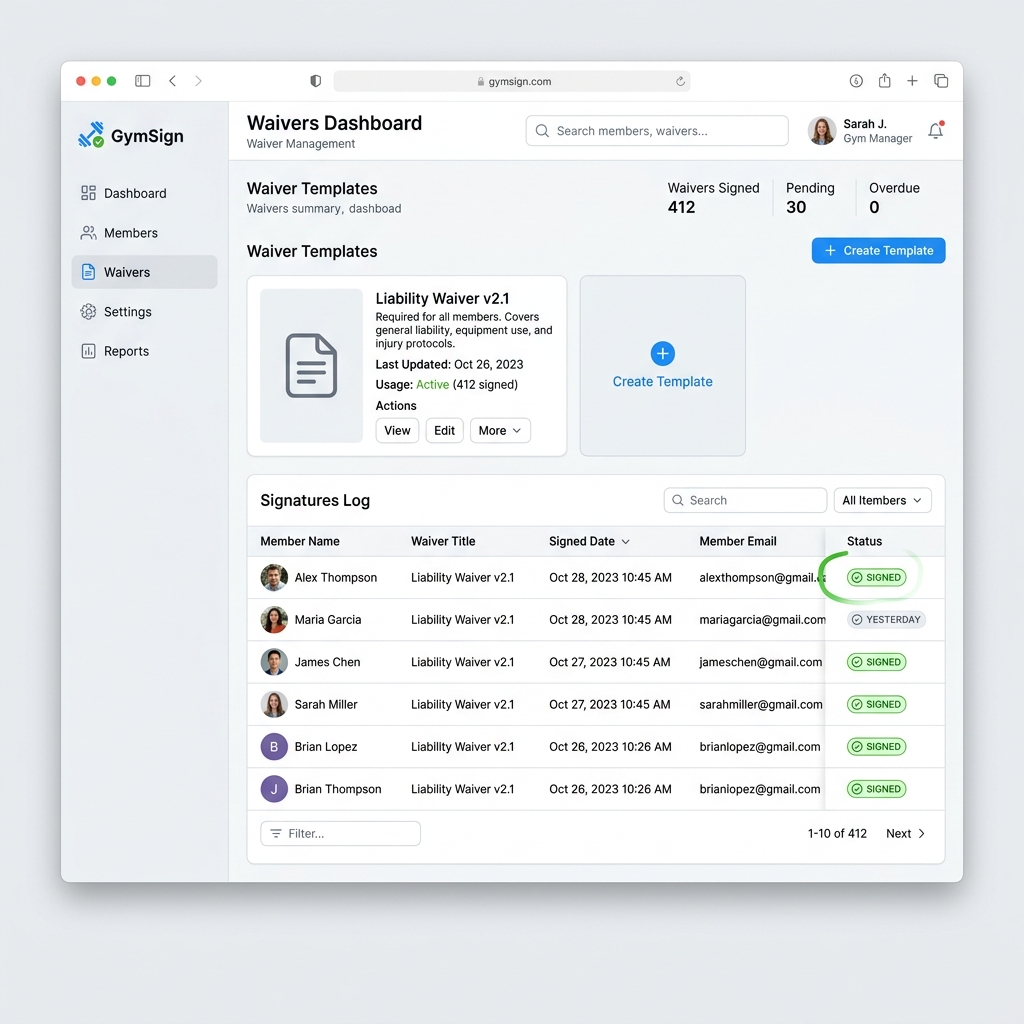
Every acceptance records who agreed, exactly when, and where it happened — signing up, joining a program, or booking a class.

Require before joining

Attach a waiver to a program and members must accept it before they can join — nobody slips through in week one.

Instant retrieval

The signatures list is searchable by member, and any record opens in full with the wording and the timestamp. Seconds, not filing-cabinet afternoons.

How it works

  1. 1Create a waiver template with your text — or paste the version your lawyer wrote.
  2. 2Attach it to signup, so new members accept it as they join.
  3. 3Attach it to a program or an event where acceptance must happen before booking.
  4. 4Every acceptance lands in the Signatures list with a timestamp.
  5. 5Open any record in full whenever you — or your insurer — need it.

Want a walkthrough of every module? Read the full admin guides.

Martial Arts SchoolExample Scenario

The dispute that took thirty seconds to answer

A dojo ran on paper waivers for years — until a parent disputed whether they'd ever signed one. The old system meant an afternoon in the filing cabinet with no guarantee. With digital waivers, the same question takes thirty seconds: search the name, open the signed waiver, read the timestamp. Their insurer was shown the digital trail at renewal time and the conversation got noticeably easier.

Illustrative example — names and figures are representative of typical studios, not a customer endorsement.

Why paper waivers fail exactly when you need them

A filing cabinet of signed waivers feels like protection right up until the moment it is tested. The problems are rarely dramatic — a form was signed but filed under a maiden name, a member updated their details and the old sheet was never matched to the new record, a busy intake week meant three people trained before anyone remembered the paperwork.

None of that matters for years, and then it matters enormously in a single afternoon. The question is never whether you have waivers — it is whether you can produce this specific person's signed waiver, and prove when they signed it. Paper answers the first question well and the second one badly.

Digital signing closes the gap in both directions. The waiver is presented as part of joining rather than as a separate errand, and the record is retrievable by name in seconds rather than by an afternoon in the records room.

What makes a waiver record actually useful

Three things separate a waiver system that helps from one that just moves the filing cabinet onto a hard drive.

The first is enforcement at the right moment. A waiver chased after someone has already trained is a compliance record with a hole in it. Requiring a signed waiver before a member can join a program means the sequence is right by construction rather than by staff discipline.

The second is the timestamp. Who signed and exactly when is the detail that carries weight in a dispute, and it is precisely the detail handwritten forms tend to lose. The third is retrieval speed — not because anyone enjoys searching, but because the confidence to answer an insurer or a solicitor immediately changes the tone of the entire conversation.

Worth stating plainly: the software handles signing, storage and retrieval. The wording of your waiver is a legal question, and it belongs with a lawyer who knows your jurisdiction and your activity. Good tooling around bad wording is still bad wording.

Waivers for children, families and casual visitors

Martial arts schools, dance studios and youth programs carry the hardest version of this problem, because the person training and the person signing are different people, and the parent who signs in February may not be the parent doing pickup in October.

The same is true of the casual edge cases every gym has: the friend brought along for a trial class, the visiting athlete dropping in for a week, the parent who joins the beginner class alongside their child. These are exactly the people most likely to slip through a paper process, and exactly the people whose signed waiver you would most want on file.

Handling this well is mostly about removing friction. When signing happens on a phone, at the point of joining, as part of a flow someone is already completing, the completion rate looks nothing like it does when the same person is handed a clipboard and a pen they have to return.
Frequently asked questions

Can I force members to sign before training?

Yes — programs can require a signed waiver before a member joins, so the waiver happens up front rather than being chased later.

Are the signatures timestamped?

Yes. Every acceptance records who agreed, when, and which version of the waiver they saw — and you can open the full record at any time.

Can I use my own waiver wording?

Yes — templates hold whatever text you provide. Have your lawyer review the wording; WeeksPro handles the signing, storage and retrieval.

What if I change the wording later?

Editing a waiver creates a new version. Earlier acceptances stay attached to the version those members actually saw, and members are asked to accept the new wording next time.

How fast can I find an old waiver?

Search the member's name in the Signatures list and open their record — seconds, not a records-room search.

Put digital waivers to work at your gym

Every WeeksPro plan includes all 21+ modules — from A$89/month +GST with a 30-day free trial, no credit card required.

Switching from another platform? The founder migrates founding partners personally — free.

See the martial arts playbook

Explore more features

All included on every plan — no add-on pricing, ever.

See all 21+ features